Rules before code
A repository instruction file sets the data-trust contract, the risky files, and a hard stop at the open pull request.

Case study
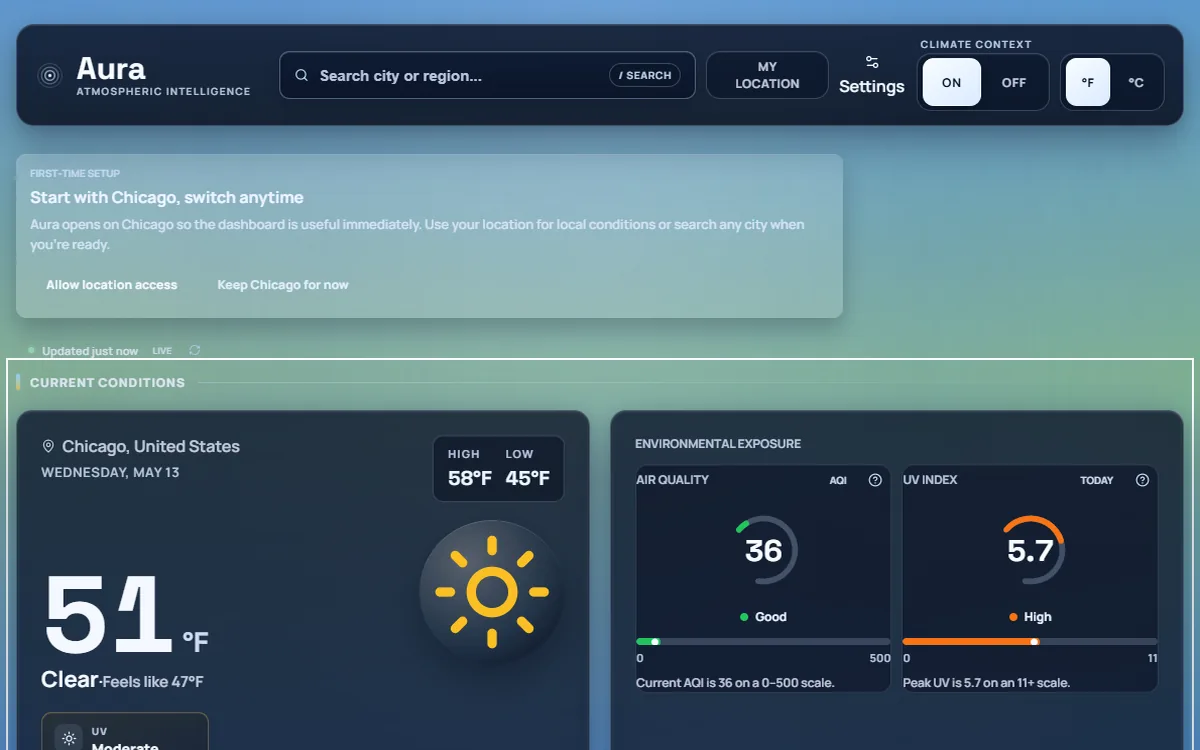
A weather dashboard built on one rule: missing data is shown as missing, never as a confident zero. This case study covers what came after that rule was in place. I directed coding agents through a severe-weather alerts milestone, where a wrong answer is a safety problem, using written operating rules, decisions I kept for myself, and verification that says what it did not prove.
Agent delivery lens
An agent can normalise a field, write the tests, and open a pull request. It should not choose the word a person reads during a tornado warning. Aura's repository separates those two kinds of work in writing, and the alerts milestone shows the separation holding under real tickets.
A repository instruction file sets the data-trust contract, the risky files, and a hard stop at the open pull request.
Wording, severity labels, and visual treatment are mine. Agents report the question and stop.
Each fix is checked against recorded live payloads, then reverted by hand to see which tests actually fail.
This is the backstory the alerts work stands on. Weather providers return null for individual readings more often than demos suggest, and JavaScript turns Number(null) into 0. Aura was rendering missing humidity as "0%" and missing pressure as "0 hPa". The fix became a data-trust contract: a missing reading stays null from the API boundary to the screen, renders as unavailable, and is announced to assistive technology as "no data available".
A later audit found the contract still leaking in three places, because individual modules had wrapped the shared helper in local versions with looser behavior. The full write-up, including the claims I got wrong along the way, is in the repository's trust contract case study.
That contract is now the first section of the agents' operating rules. Alerts raise the stakes: a dropped warning is a false all-clear.
A competitive audit against The Weather Channel, AccuWeather, and MyRadar produced one finding that outranked the rest. Aura's alert card showed the event name, a headline, a priority, and an expiry. The NWS description was normalised and read by no component. The NWS instruction, the text that says what to do, was never normalised at all. A Severe Thunderstorm Warning rendered without "seek shelter".
The same narrow projection caused a second defect. The CAP status field was not read, so a drill published on the same endpoint as real alerts rendered as an active hazard. A test message was live in the national feed when this was measured.
The milestone that followed added no new provider, no new dependency, and no layout redesign. It made the card use what NWS already sends.
I set the product direction, wrote the agent operating rules, made every design and scope decision, and reviewed and merged each pull request. Coding agents implemented under those rules.
In practice that meant commissioning the audit, approving the remediation plan and its ticket order, answering each question the agents escalated, reading every pull request including the parts flagged as going beyond the ticket, and deciding what merged.
The rules live in the repository, so every agent session starts from the same contract.
The rules were tested by the first implementation ticket. The milestone spec proposed a response chip. The agent shipped the protective-action text and left the chip out, because mapping CAP response codes to words a person reads is a vocabulary decision the rules reserve for me. I approved the wording, and the next pull request transcribed it rather than choosing it: "Take shelter", "Evacuate", "Avoid the area", "Monitor conditions", and four more. Unknown codes render no chip.
An alert's onset on a long-fuse product is a forecaster's judgment that gets revised as the event approaches. In the sample, no upcoming onset was under an hour away.
Show lead time in buckets such as "Starts within 12 hours". Never print a countdown.
The card is less precise than competitors that show minutes. It also never displays two significant figures of confidence on a number that will be reissued before it arrives.
NWS publishes two end times that answer different questions. expires is when the message must be reissued. ends is when the hazard is forecast to be over. Aura had normalised the first under a name that promised the second, and both the card and the offline-restore path believed the name.
The agent found this while scouting the next ticket against live data, and I split it into its own pull request ahead of that ticket. One recorded Beach Hazards Statement had an onset of 05:00, a message expiry of 05:30, and a hazard end of 15:00. Under the old rule it vanished from the card for nine and a half hours, the hours it mattered most.
The fix resolves one shared rule for both paths, so the card and the restore logic cannot drift apart again. Where NWS sends no hazard end, the old behavior is kept exactly, so no alert gets a shorter window than it had.
Source of these figures: measurements taken by the implementing agent against api.weather.gov/alerts/active on September 18, 2026 and reported in the pull requests. They are a single-day sample, not a monitored metric.
axe against the live dashboard and the missing-data state as part of the end-to-end suite.aria-label naming the field, such as "Recommended response: Avoid the area".aria-label on the row button replaced its contents. Automated checks prove the absence of known violations. They do not prove the page makes sense read aloud.The alerts milestone is merged to main. Its last open item is a screenshot of a real warning rendered in production, which has to wait for a real warning. The interface has since been redesigned, and follow-up fixes from a later audit are in review. Aura remains a portfolio project and should not be described as a production weather platform.
Agents are most useful when the rules say what they may not decide. The pull request I value most from this milestone is the one where the agent declined to ship a feature the spec asked for, because the wording was mine to choose.
I also learned to read a verification section for what it admits. "Four new tests pass" tells me little. "Reverting the fix fails one of the four, and here is why" tells me what is actually protected.